Product Phase Out Query


Product Phase Out Query
Please follow these steps to query phase out product list.
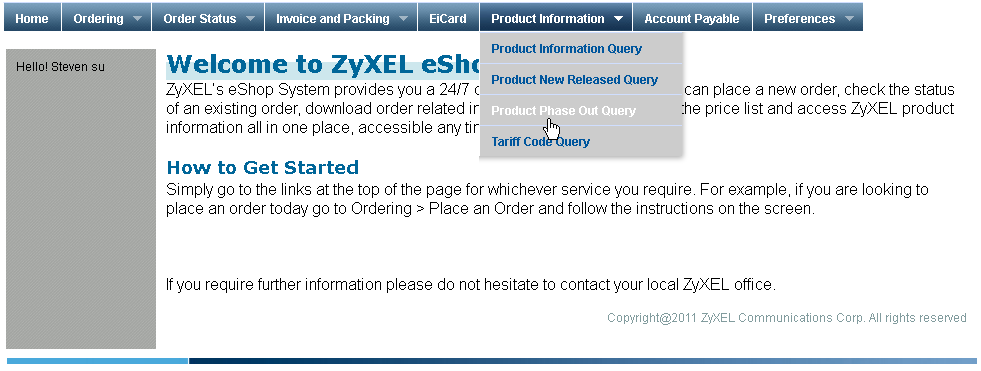
1. Please find and click on the "Product Phase Out Query" options under "Product Information" tab on menu bar.
2. You will see a form that looks like the picture below. You can set some search criteria by Description ( partial string of Model Name ) , Part Number and Last Buy Date.

3. And then your product list will be displayed in a table under the search form which is as the picture below.
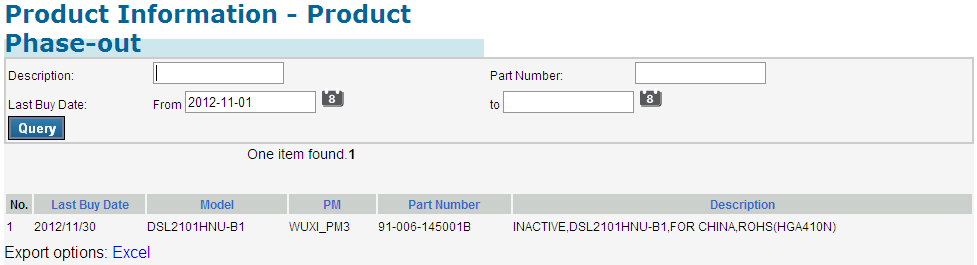
The system can export this data table to a Excel file as you wish. Please click on the "Excel" link under the data table to open a message window and click on "Save" to save it on your local computer.
Created with the Personal Edition of HelpNDoc: Full-featured Documentation generator